 Stud Finder
iPhone magnetometer · no extra hardware
Know what’s behind the wall before you drill.
Stud Finder Detector reads the magnetic sensor already in your iPhone and tells you where the screws, nails and metal studs are hiding.
How it works
Four moves, about twenty seconds.
Your iPhone has a magnetometer near the top corner. Steel disturbs the magnetic field around it, and the app turns that disturbance into a number, a needle and a sound.
01
Take the case off
Magnetic cases, metal plates and MagSafe rings sit on top of the sensor and drown out the signal. Bare phone gives a clean reading.
02
Calibrate
Point the phone up and move it in a figure of eight until the app says it is ready. Ten seconds, and the readings stop drifting.
03
Slide the top corner along the wall
Slowly. The sensor sits by the camera, so that corner is what reads the wall. Sweep across, not up and down.
04
Listen for the spike
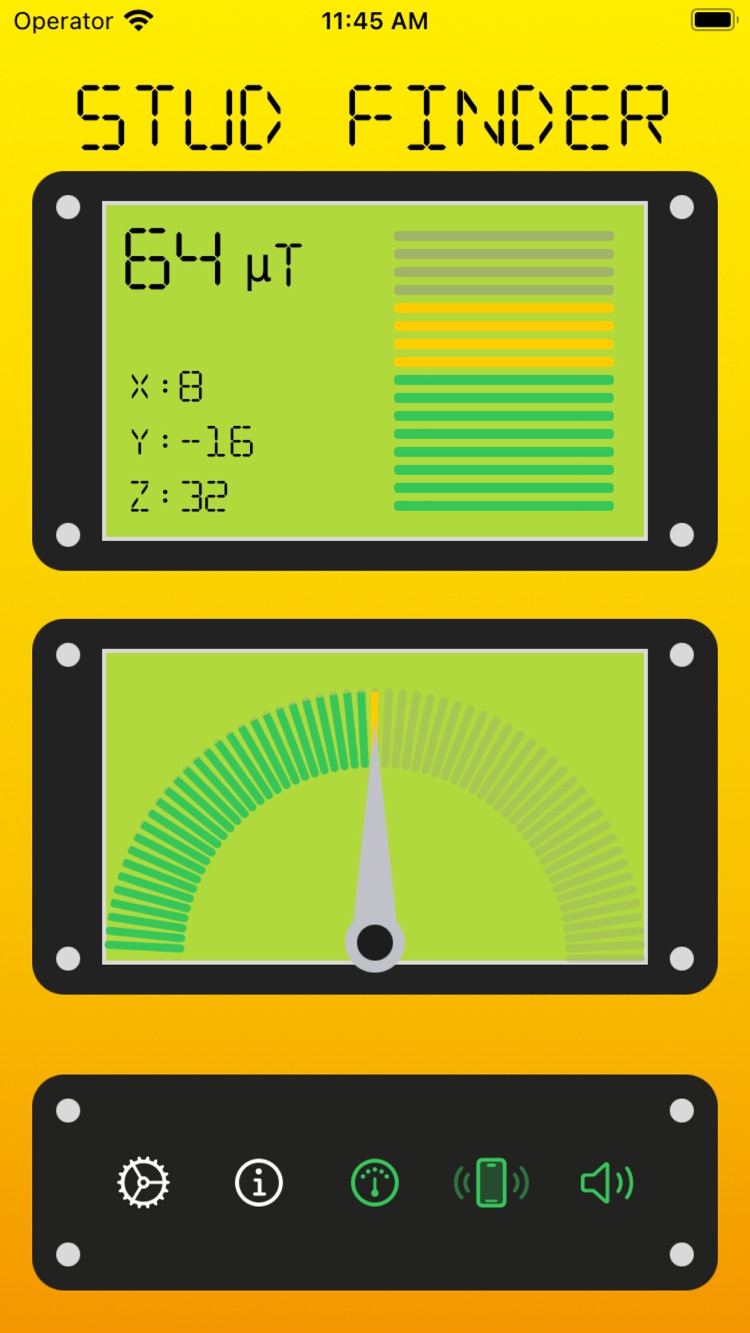
The gauge climbs, the phone buzzes and the tone rises as you cross metal. Mark the peak. Repeat 30–40 cm higher and lower — three peaks in a vertical line is a stud, one lone peak is probably a pipe or a stray screw.
READOUT
What the numbers mean
µT is the field strength in microtesla. X, Y and Z are the three axes of the sensor. You do not need to read them — the needle and the sound do the work — but they are there when you want to compare two spots precisely.
What it finds
An honest list.
This is a magnetometer, not radar. It is very good at one thing and blind to another, so here is both halves.
It finds
- ✓Screws and nails holding drywall to the studs behind it
- ✓Metal studs in steel-framed walls
- ✓Steel pipes and conduit running inside the cavity
- ✓Iron, steel and other ferrous metal in general
- ✓Hidden fasteners under paint, wallpaper and thin panelling
It cannot find
- ×Wood with no metal in it. A magnetometer reads magnetic fields; timber has none
- ×Copper, aluminium, brass, gold, lead, tin, zinc. None of them are ferrous
- ×Live wiring. This app does not detect voltage
- ×Plastic pipes and plastic conduit
Read this before you buy
An iPhone cannot detect a bare wooden stud, and no app can change that — the sensor simply does not respond to wood. What it does is find the steel fasteners driven into the stud, which is enough to locate the stud in almost every drywall build. If your wall is fixed with adhesive or non-ferrous fasteners, buy a capacitive stud finder instead. The app says the same thing on first launch, and links to the tools we would use ourselves.
Free and Pro
Free to use. Pro if you use it a lot.
Free
- ✓Full detection, in short scanning sessions
- ✓Watch a rewarded video for 30 more seconds of scanning
- ✓Bubble level, sound and haptics included
- ✓Banner ads
Pro
- ✓Unlimited detection, no session timer
- ✓No ads anywhere in the app
- ✓Weekly subscription or a one-time lifetime unlock
- ✓Prices are shown in the app for your country
FAQ
Questions people actually ask.
Can an iPhone really find a wall stud?
It finds the metal in the stud, not the wood. Drywall is fixed to studs with screws or nails every 30 to 40 cm, and the magnetometer picks those up through the board. Line up two or three of them vertically and you have found the stud.
Does it detect wood studs with no metal in them?
No. A magnetometer measures magnetic fields, so bare timber is invisible to it. If a stud was glued or fixed with non-ferrous fasteners, no phone app can find it. That is a limit of the hardware, not of this app.
Which metals does it detect?
Ferrous metals: iron, steel, steel screws and nails, metal studs, and steel pipes or conduit. Copper, aluminium, brass, gold, lead, tin and zinc are not ferrous and will not register.
Why does the app ask me to remove my phone case?
Cases with magnets or metal plates, and MagSafe accessories, sit right on top of the sensor and swamp the reading. Take the case off before you scan.
Where is the magnetometer on an iPhone?
Near the top corner of the phone, close to the camera. Hold that corner against the wall and slide slowly, because that corner is what is doing the reading.
Why do the readings jump around?
Usually the sensor needs calibrating: point the phone up and move it in a figure of eight until the app stops warning you. Speakers, other phones, radiators and steel furniture also bend the field, so scan away from them.
Is the app free?
Yes. Free use runs in short detection sessions, and you can watch a rewarded video for more scanning time. Pro removes the ads and the time limit, as a weekly subscription or a one-time lifetime unlock. Current prices are shown in the app.
How do I cancel a Pro subscription?
Subscriptions are billed by Apple, so cancel them in Settings → your name → Subscriptions on your iPhone. The Settings screen in the app links straight there.
Does the app collect my data?
It has no accounts and asks for no personal details. Magnetometer readings never leave your phone. Analytics and advertising SDKs do collect device-level data — the privacy policy lists exactly which, and how to opt out.